
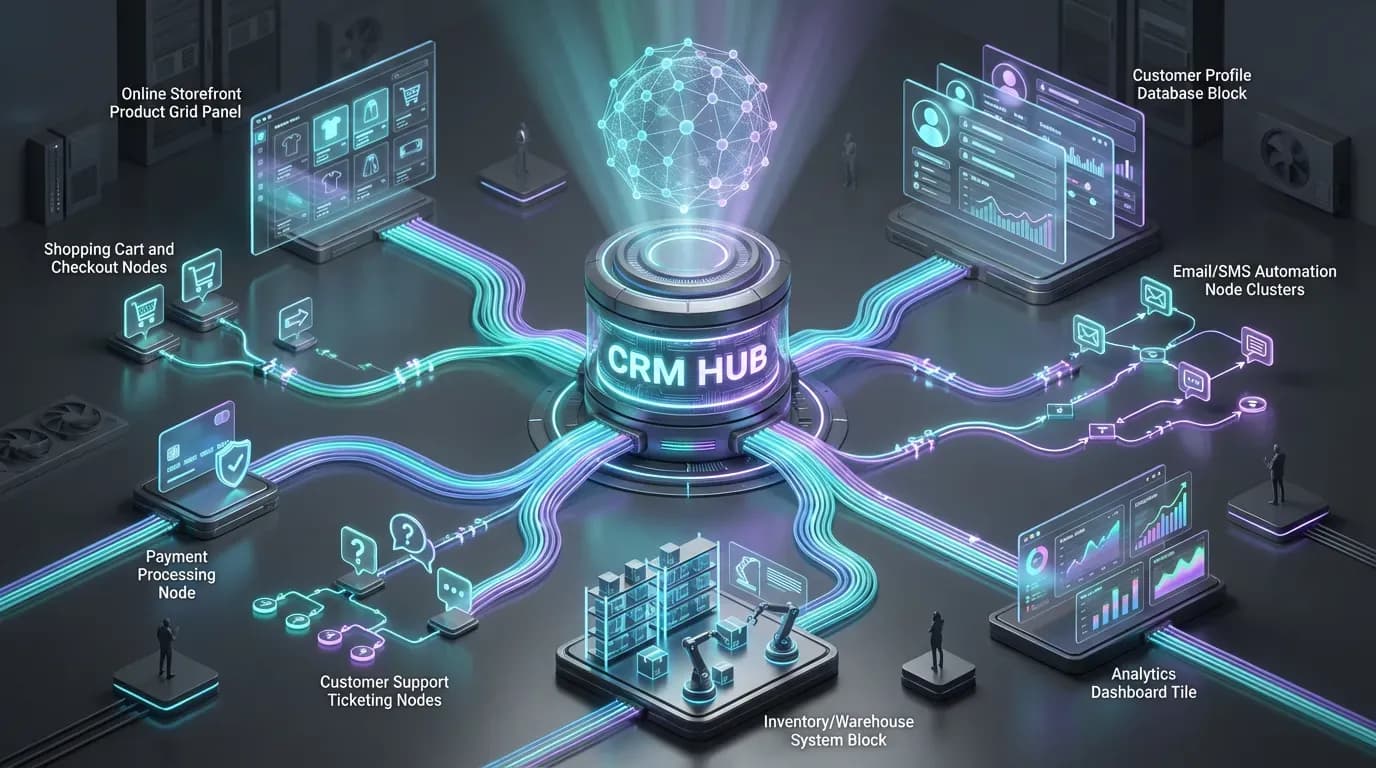
What Is CRM Integration for E-Commerce?
Customer Relationship Management (CRM) integration for e-commerce is the process of connecting your online store platform with a CRM system so that customer, order, and marketing data can flow seamlessly between the two. Instead of managing scattered spreadsheets, siloed email tools, and disconnected analytics, you build a single, unified customer view that powers smarter decisions and automated experiences.
For modern e-commerce businesses, startups, and digital agencies managing multiple stores, CRM integration is no longer a nice-to-have. It is a core part of an efficient revenue engine, enabling consistent customer journeys across channels, accurate reporting, and scalable automation that does not depend on manual work.
Why CRM Integration Matters for E-Commerce Growth
When your e-commerce platform (such as Shopify, WooCommerce, Magento, BigCommerce, or custom storefronts) operates in isolation from your CRM, you lose both visibility and control. Teams cannot see what customers actually buy, marketing campaigns are poorly targeted, and service agents lack the context they need to respond effectively.
By integrating CRM and e-commerce, you unlock several strategic advantages:
- Single source of truth: All purchase history, interactions, and support tickets live in one place.
- Higher conversion rates: Segmented and personalized campaigns based on real customer behavior.
- Improved retention: Automated lifecycle journeys that keep customers engaged post-purchase.
- Operational efficiency: Fewer manual exports, imports, and spreadsheet cleanups.
- Better forecasting: More accurate revenue projections using complete data.
Ultimately, CRM integration gives your teams the insight and automation capabilities needed to move from ad hoc campaigns to a structured, repeatable growth engine.
Key Data Points to Sync Between Your Store and CRM
Effective CRM integration starts with deciding which data needs to flow between systems. The goal is to enrich your CRM with enough information to drive segmentation, automation, and reporting, without overcomplicating your architecture.
Customer Profiles
At minimum, every customer record from your e-commerce platform should be created and updated in your CRM. This typically includes:
- Full name and email address
- Phone number and primary shipping country/region
- Account creation date and last login/visit timestamps (if available)
- Marketing consent or subscription status
These fields allow sales, marketing, and support teams to identify, contact, and segment customers correctly.
Order and Transaction Data
Transactional data is where CRM integration starts to generate real business value. Consider syncing:
- Order IDs and timestamps
- Order value (gross, net, discounts, tax, shipping)
- Products purchased (SKUs, categories, quantities)
- Order status (paid, fulfilled, cancelled, refunded)
- Payment method (card, PayPal, BNPL, etc.)
With this information inside your CRM, you can build powerful segments such as “high-value repeat customers”, “subscribers at risk of churn”, or “first-time buyers who used a discount code”.
Behavioral and Engagement Signals
Where possible, combine transactional data with engagement metrics to deepen your insights:
- Email campaign opens, clicks, and unsubscribe events
- Abandoned cart events and abandoned checkout details
- Site visits, key page views, and product browse behavior (if supported)
- Support tickets or chat conversations linked to a customer
This mix of behavioral and transactional data enables advanced use cases like predictive churn models, behavior-triggered email flows, and proactive support for at-risk accounts.
Core Use Cases of CRM Integration in E-Commerce
Once the data is flowing correctly, your team can design workflows that directly impact revenue, customer experience, and operations.
1. Abandoned Cart and Checkout Recovery
By sending cart and checkout events to your CRM, you can automatically trigger recovery sequences. These workflows can include:
- Timed email reminders with product details and dynamic cart links
- Personalized incentives for high-intent or high-value carts
- Sales outreach for B2B buyers with large pending orders
Over time, you can test and optimize these sequences directly in your CRM, improving recovery rates without permanently increasing discount levels.
2. Post-Purchase Nurture and Cross-Sell
CRM integration allows you to build structured post-purchase journeys tailored to each customer’s order history. Typical scenarios include:
- Transactional follow-ups (order confirmation, shipping, delivery updates)
- Onboarding and how-to content for complex products
- Cross-sell and upsell suggestions based on purchased categories or SKUs
- Timed replenishment reminders for consumable products
This approach increases customer lifetime value (LTV) by turning one-time buyers into repeat, loyal customers.
3. Segmentation and Personalization
With complete customer profiles inside your CRM, you can build segments such as:
- VIP customers with a lifetime value above a defined threshold
- Infrequent buyers with high average order value
- Customers who purchased during specific campaigns or seasons
- Inactive customers who have not ordered in the last 6–12 months
These segments can then receive tailored email, SMS, and advertising campaigns, increasing relevance and reducing wasted spend. Personalized product recommendations and dynamic content blocks in your emails or on-site experiences can also be driven by CRM data.
4. Unified Support and Service Experience
When your support team can see a full order history, previous tickets, and marketing interactions within the CRM or connected helpdesk, they can resolve requests faster and with more context. For example, they can:
- Identify high-value customers and prioritize their cases appropriately
- Proactively offer refunds, replacements, or discounts if a pattern of issues arises
- Update preferences and consent in real time, ensuring compliance and trust
This unified view reduces friction for both customers and agents, improving satisfaction and long-term retention.
Technical Approaches to CRM Integration
The best integration strategy depends on your existing stack, scale, and internal resources. Broadly, you can choose from three main approaches.
Native and Marketplace Integrations
Many leading CRMs and e-commerce platforms offer pre-built, native integrations or marketplace apps. These are typically the fastest way to get started, particularly for small and mid-sized businesses that do not have large development teams.
However, native integrations may not cover all your use cases, especially if you operate multiple storefronts, complex B2B workflows, or custom logic for pricing and fulfillment.
Integration Platforms and Automation Tools
Integration platforms and workflow automation tools (iPaaS) act as a bridge between your CRM, e-commerce platform, payment gateways, marketing tools, and internal systems. They are ideal for organizations that need:
- Custom field mapping and data transformations
- Conditional logic based on order value, region, or product type
- Multi-step automations spanning multiple tools and teams
With this approach, you can orchestrate complex flows—such as automatically creating CRM opportunities for high-value B2B orders or syncing subscription events from payment processors—without building everything from scratch.
Custom API Integrations
For high-growth e-commerce brands, marketplaces, and digital agencies with highly specific requirements, custom API-level integrations may be the best long-term option. This path gives you:
- Full control over when and how data is synchronized
- Optimized performance and reliability for large volumes
- Deep integration with internal systems like ERP, WMS, or custom data warehouses
Custom integrations require careful planning, documentation, and monitoring, but they can deliver a strategic advantage where off-the-shelf tools fall short.
Best Practices for Successful CRM–E-Commerce Integration
A technically working integration is not enough; it needs to be stable, secure, and aligned with your commercial goals. The following best practices help ensure long-term success.
Define Clear Objectives and KPIs
Before you start, clarify what you want the integration to achieve. Common objectives include increasing repeat purchase rate, reducing cart abandonment, or improving the speed of customer support resolution. Translate these into measurable KPIs and set up dashboards in your CRM or analytics tools to track progress.
Standardize and Clean Your Data
Duplicate records, inconsistent naming, and missing fields can severely limit the value of your integration. As part of the implementation, invest time in:
- Normalizing key fields such as country, currency, and channels
- Defining unique identifiers for customers and orders
- Consolidating duplicate contacts and accounts
Clean, well-structured data is the foundation of reliable reporting and automation.
Start with High-Impact Workflows
Rather than trying to automate everything at once, begin with a small set of high-impact workflows, such as abandoned cart recovery and post-purchase nurture. Validate the data quality, monitor performance, and gather feedback from your teams before expanding into more advanced use cases.
Ensure Security and Compliance
CRM integration involves handling sensitive customer data, including personal information and sometimes partial payment details. Work with your security and legal teams to ensure that:
- Data is encrypted in transit and at rest where appropriate
- Data retention and deletion policies respect applicable regulations (GDPR, CCPA, etc.)
- Access controls and roles are correctly configured in both systems
Compliance is not only a legal obligation; it is a key component of customer trust and brand reputation.
From Connected Data to Competitive Advantage
Effective CRM integration for e-commerce does more than synchronize records between two platforms. It creates a connected ecosystem in which marketing, sales, operations, and support all work from the same customer reality. This alignment enables smarter segmentation, more relevant automation, and sharper strategic decisions that directly support revenue growth and brand loyalty.
By approaching CRM integration with clear objectives, robust data architecture, and a phased rollout of high-value workflows, e-commerce businesses, startups, and digital agencies can transform disconnected tools into a cohesive digital revenue engine; if you are exploring how to design or optimize this kind of integrated architecture, lakverse.com offers services and products capable of providing solutions to exactly these topics in a way that aligns with modern, scalable business needs.

